If the CM chooses to notify anyone regarding a job they have recently opened, they would need to add you or a distribution list you may be a part of to the notification field in the job.
This is up to the CM and is not currently enforced.
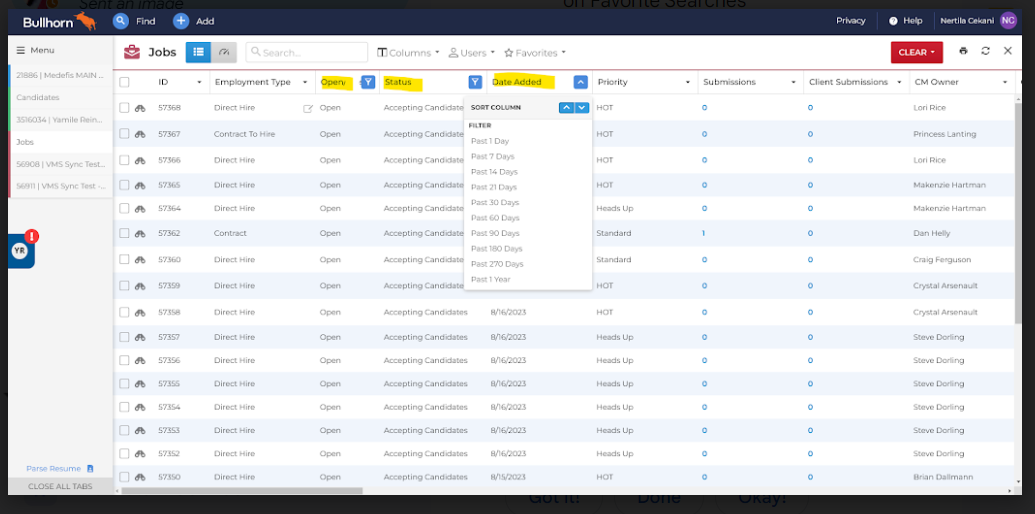
To view all jobs recently added in Bullhorn, you'll use the Job list.
From your Bullhorn Menu click on Jobs and the below list will come up.
Click CLEAR read button to remove any filtering you previously used.
From here you can search for Open jobs in Accepting Candidate Status and if you choose, Date Added - Once you run this search, we would recommend you make this one of your Favorites to quickly access again.
Here's a step-by-step on Favorite Searches https://help.bullhorn.com/bhatsTopics/s/article/ATS-Favorite-Searches
Was this article helpful?
That’s Great!
Thank you for your feedback
Sorry! We couldn't be helpful
Thank you for your feedback
Feedback sent
We appreciate your effort and will try to fix the article